Google Ads Campaign Builder
Build a Google Ads Campaign by Describing It
All six campaign types, created through chat. Describe the campaign you want — the AI builds the structure, ad groups, keywords, and ads in your account, and shows you the exact changes before anything goes live.
Hello! 👋
I'm your AllAble assistant. Fill in the highlighted fields below and hit send — I'll take it from there.
- 6
- Campaign types: Search · Display · Shopping · Video · PMax · Demand Gen
- 1
- Conversation from brief to built campaign
- 0
- Entities created without your confirmation
- MCC
- Build the same structure across client accounts
Launching one campaign means walking a twelve-screen wizard — settings, budget, bidding, locations, ad schedule, then ad groups, then keywords, then the ads themselves — and every screen asks a question you already answered in the brief.
Google Ads Editor moves the work offline but keeps every field. Copying last quarter's campaign copies last quarter's mistakes along with its structure. Either way, the campaign that ships is the one that survived the form, not the one you planned.
What It Builds
Every Campaign Type. One Description.
All Six Campaign Types
Search, Display, Shopping, Video, Performance Max, and Demand Gen. The AI knows which settings each type requires and asks only for what it can't infer from your brief — no hunting for the one field the wizard hid under an accordion.
Structure, Keywords, and Ads in One Pass
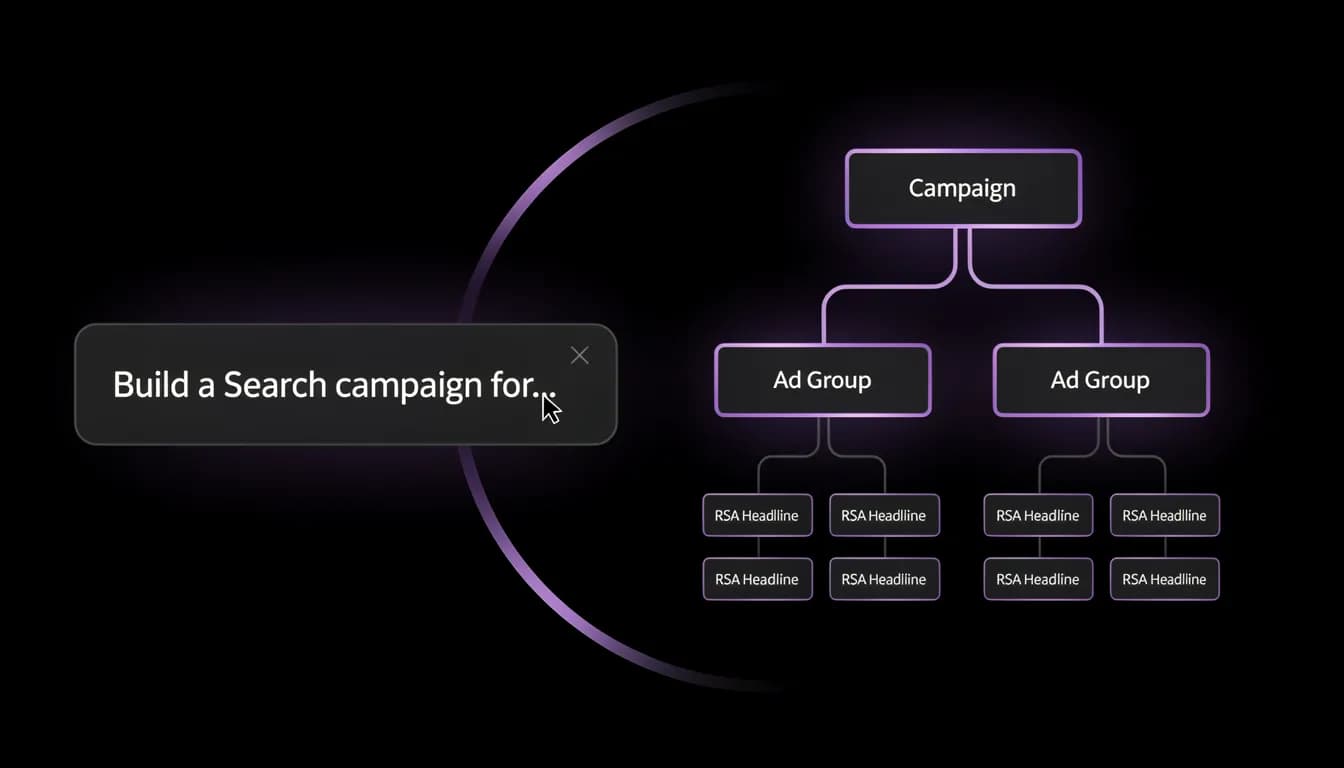
A campaign isn't one entity. The AI creates the campaign, its ad groups, the keyword sets and match types for each, and responsive search ads written against that ad group's intent — as a single build, not four separate sessions.
Nothing Publishes Until You Confirm
ASK mode is the default: the AI drafts and explains the build without touching your account. Switch to Execute and it diffs the plan against your account's baseline, shows exactly which entities will be created, and waits for your confirmation.
The Same Build, Across Client Accounts
Connect a Google Ads manager account and roll a proven structure into any connected client account from one workspace. Adjust the budget, locations, and keyword set per client in the same conversation — no export, no per-account re-entry.
From Brief to Live Campaign
The Wizard Asked. Now You Just Say It.
Describe the campaign the way you'd describe it to a colleague — what you're selling, who it's for, the budget, the market. The AI turns that into a real Google Ads structure and tells you what it assumed.
- Start from a sentence: "Search campaign for our accounting software, €80/day, Slovakia and Czechia, target CPA €40." The AI proposes the full structure before creating anything.
- Ad groups are themed, not dumped: the AI splits keywords by intent and writes ads matched to each group rather than one generic ad reused across all of them.
- Every assumption is stated. Match types, network settings, and bidding strategy come back written out in plain English, so you correct them in the chat instead of discovering them in a report a week later.
- Change your mind mid-build — "make it three ad groups, not five" or "switch to Maximize Conversions" — and the AI revises the plan rather than restarting it.
- Execute mode diffs the plan against your account's baseline JSON and lists every entity it will create. Nothing reaches Google Ads until you confirm that list.
- Once it's live, the same chat manages it: bids, negatives, new ad variants, and reporting all run against the campaign you just built.
Who It's For
Three People Who Lost an Afternoon to the Wizard
In-House PPC Manager
You know exactly what the campaign should look like — the structure has been in your head since the planning meeting. The wizard is pure transcription cost. Describe the plan once and review a built campaign instead of typing it into forty fields.
Marketing Agency
Every new client starts with the same build, re-entered per account, and the first launch slips a week because it's nobody's billable hour. Roll the structure into each MCC-connected account from one chat and spend the saved day on the part clients actually notice.
SMB Owner
You've abandoned the campaign wizard twice because it asked about bid strategies before it asked what you sell. Say what you sell, what you'll spend, and where — and get a campaign structured the way a specialist would have structured it.
Side by Side
Allable vs. The Three Ways to Build a Campaign
| Feature | Allable | Google Ads UI | Google Ads Editor | Duplicate a template |
|---|---|---|---|---|
| Build from a plain-English brief | Included | Form only | Form only | Not included |
| Campaign, ad groups, keywords and ads in one pass | Included | Sequential screens | Manual per level | Copies old structure |
| All six campaign types | Included | Included | Partial support | Only what exists |
| Preview of exact changes before publishing | Diff + confirm | Review screen | Pending changes | Not included |
| Revise the plan conversationally | Included | Re-enter fields | Re-enter fields | Not included |
| Same build across MCC client accounts | Included | One at a time | Copy/paste per account | Manual |
| Manage the campaign after launch in the same place | Included | Included | Bulk edits only | Not included |
| Desktop install required | None | None | Required | None |

FAQ
Questions About Building Campaigns With AI
Which Google Ads campaign types can Allable create?
All six: Search, Display, Shopping, Video, Performance Max, and Demand Gen. Each type has different required settings — asset groups and audience signals for Performance Max, listing groups for Shopping, keyword sets for Search — and the AI asks only for the ones it can't infer from your brief.
Does the AI publish the campaign automatically?
No. ASK mode is the default and is read-only: the AI drafts the campaign and explains it without touching your account. Creating entities requires Execute mode, and even then the AI shows a diff of every entity it will create and waits for your confirmation before the mutation is sent.
How detailed does my description need to be?
A sentence is enough to start — what you're advertising, the budget, and the market. The AI proposes a full structure from that and states every assumption it made about match types, networks, locations, and bidding, so you correct them in the chat rather than in a report later.
Can I build campaigns for multiple client accounts?
Yes, via MCC. Connect a Google Ads manager account and every connected client account is available in the same workspace. Build the structure once, then roll it into each account with per-client budgets, locations, and keyword sets — without exporting or switching dashboards.
Can I edit the campaign after the AI builds it?
Yes, in the same chat. Bids, budgets, keywords, negatives, ad variants, and audience settings are all managed conversationally after launch. The campaign builder isn't a separate tool — it's the same agent that then runs the account.
Is the campaign builder available on the free trial?
Yes. Connect your Google Ads account, build a campaign, and review the proposed structure during the trial without entering a payment method. Because ASK mode is read-only, you can go all the way to a reviewed plan before anything touches the account.
Describe Your Next Campaign. Review It Built.
Connect your Google Ads account and build a campaign from a sentence. Read-only until you say otherwise, free during trial, no credit card required.